
Instagram links that open in the app
Drop your profile, reel, or post URL into OpentoApp and share a shorter link that launches Instagram instead of a mobile browser. Handy for bios, story stickers, and cross-promotion where you want follows, not friction.




Instagram in-app browsers hide DMs, notifications, and sometimes even the follow button. Sending people straight into the app keeps the experience they already know. The same OpentoApp account also handles YouTube, Amazon, Telegram, and other networks if you cross-post.






After you publish a link, signed-in users can see click totals and where traffic came from, enough to tell which caption or collaborator actually moved the needle.
When this helps most
Link-in-bio tools often stack several networks. If Instagram is your main funnel, give it the direct-app treatment so new visitors land on your grid, not a login wall in Chrome.
Works on both iOS and Android when the Instagram app is installed. You can rename links in the dashboard so the short URL still looks like your brand in screenshots.
Tips for Instagram-specific links
Use the full instagram.com URL from your profile or the share menu on a post. Private accounts still respect Instagram's own login rules. We simply choose the app route when possible.
Pair the short link with a clear call to action in your caption ("Tap the link in bio") so people know what to expect after the redirect.
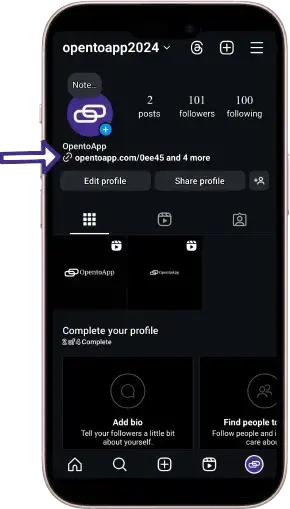

Create an Instagram app link in a few steps
Open opentoapp.com website in any browser.
Click on "Create Link" button.
Paste your Instagram profile or post URL (copy link from the app or browser).
Enter the captcha code
Click on the create link button and wait for a second.
Copy the short link and add it to your bio, story, or pinned comment.

Why creators switch to app-opening links
- Faster path to follow, DM, or shop on Instagram
- Short URLs that look clean in bios and printed QR codes
- Click stats without a separate analytics subscription
- Free to try. No card required for your first links
Guides for other apps
Pick the app you share most often. Each guide walks through the same free link setup, tuned for that platform.
Copyright © 2024 OpentoApp All rights reserved.